 English
 Bahasa Melayu
 Suomen kieli
 عربي
عربي  Português
 Français
 Pусский
 Español
Why Does My DC Isolator Switch Feel Hot to Touch? | SUNTREE


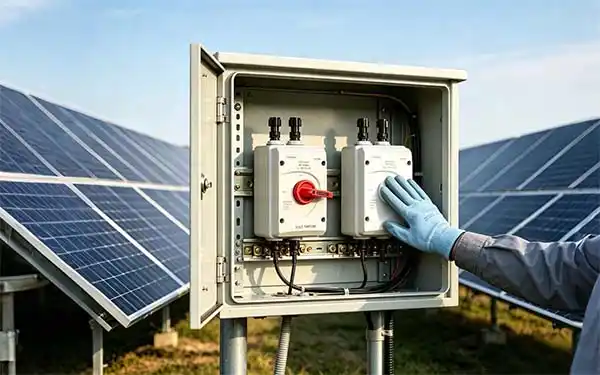
You're doing your routine PV system walk-down, and your hand brushes against the DC isolator enclosure. It's hot—hot enough that you pull your hand back immediately.
Here's the hard truth: a DC isolator switch that feels hot to the touch is never normal. While some warmth is expected under full load, excessive heat signals a problem that needs immediate attention. Rooftop DC isolators have been responsible for many solar system fires. In Australia alone, 28 house fires were caused by faulty solar installations in 2018. Don't let your site become a statistic.
This guide walks you through the common causes of DC isolator overheating—from the most likely to the more serious—and gives you a clear action plan.
A Little Warm Is Normal – How to Judge the Severity
Not every warm switch is a crisis. Understanding the difference between normal operating temperature and a dangerous hot spot is your first step.
The Hand Test
As a rough field guide, if you can hold your hand against the switch enclosure comfortably for several seconds, the temperature is likely within a normal range—roughly 40–50°C. In full sun with the system operating at peak output, some warmth is expected.
When to Worry
If you touch the enclosure and instinctively pull your hand away within one second, the surface temperature has likely exceeded 70°C—this is a red flag. Other warning signs include:
-
Plastic softening or discoloration around the enclosure
-
A burning smell near the switch
-
Visible melting or deformation of the housing
Safety first: Never touch the metal terminal area of a hot switch with bare skin. Use the back of your hand to check temperature—if there's an electrical fault, your hand's natural reflex will pull away from the surface rather than gripping it.
The Most Common Culprit – Loose Terminal Screws
Loose terminal connections are the first cause of DC isolator overheating—and fortunately, they're also the easiest to fix.
How a Loose Connection Generates Heat
When a terminal screw isn't torqued to specification, the contact area between the cable lug and the terminal busbar is reduced. This creates high contact resistance. As current flows through this resistance, Joule heating generates concentrated heat at the connection point. The heat then conducts through the terminal into the switch enclosure.
Think of it like a kink in a garden hose—the water pressure builds up at the restriction, and energy is dissipated as heat.
The Fix – Power Off and Re-Torque
Do not attempt this while the system is live.
-
Isolate the DC side following your site's LOTO procedure.
-
Allow the switch to cool to ambient temperature.
-
Use a torque screwdriver—not a standard screwdriver—to tighten all terminal screws to the manufacturer's specified torque value.
-
Check both the line side and load side terminals.
A torque screwdriver is non-negotiable here. Over-tightening can damage terminals; under-tightening leaves you back where you started.
Another Possibility – Undersized Switch for the Load
If your terminals are tight but the switch is still hot, the next suspect is incorrect sizing.
The Consequences of Overloading
Every DC isolator has a rated current printed on its housing. If the actual operating current exceeds this rating—even occasionally—the internal contacts will overheat. Sustained overheating accelerates contact oxidation and spring temper loss, which further increases contact resistance in a vicious cycle.
How to Verify
-
Use a DC clamp meter to measure the actual current flowing through the switch during peak solar irradiance.
-
Compare this reading against the rated current printed on the switch label.
-
Factor in temperature derating—many isolators need to be derated in high ambient temperatures.
Critical note: A switch rated for 15A at 250V AC may only be rated for 15A at 12V DC. DC ratings are fundamentally different from AC ratings. Always verify that your switch is properly rated for DC-PV2 utilization category.
A More Serious Issue – Internal Contact Deterioration
When terminals are tight and the switch is correctly sized, but overheating persists, the problem is likely inside the switch itself.
What Happens Inside After Years of Use
DC isolators operate in a harsher electrical environment than their AC counterparts. Unlike AC, DC has no natural current zero-crossing, meaning any arc that forms during switching is sustained longer. Each time the switch is operated under load, micro-arcing occurs at the contact surfaces.
Over 500–800 load-break cycles, contact resistance can increase by 200–400%. Thermal imaging of degraded switches typically reveals hot spots 15–22°C above ambient with uneven temperature distribution across the contact face.
Contact resistance increases gradually—from about 50 microhms to 180 microhms over 600–800 cycles—but thermal failure accelerates exponentially once resistance exceeds 150 microhms. A switch at 140 microhms might function for months; at 160 microhms, it can fail within weeks.
Why Re-Torquing Won't Help
This is internal contact degradation—not a connection issue. No amount of external screw tightening will fix burned, pitted, or oxidized contacts inside the switch. The only solution is replacement.
Environmental Factors – Sun and Enclosure
Sometimes the heat isn't coming from the switch at all—it's coming from the environment.
Direct Sun Exposure
A black plastic enclosure in direct sunlight on a 40°C day can reach surface temperatures of 70°C or more from solar heating alone. This is why quality DC isolators are often installed with heat shields or sun shades. The external heat doesn't necessarily mean the switch is failing—but it does reduce the switch's ability to dissipate internally generated heat, accelerating wear.
Poor Ventilation
If the isolator is mounted inside a tight, sealed enclosure with other heat-generating equipment, trapped heat has nowhere to go. Over time, this cumulative heat exposure degrades insulation and accelerates contact oxidation.
Fix: Ensure adequate ventilation around the switch. Consider installing a sun shield for outdoor installations. Move the switch out of direct sunlight if possible.
A Simple Diagnostic Flow – What to Do When You Feel Heat
When you encounter a hot DC isolator, follow this step-by-step protocol:
| Step | Action |
|---|---|
| 1 | Do not touch metal parts. Use the back of your hand to check enclosure temperature. Use a non-contact voltage tester or multimeter to confirm the enclosure is not live. |
| 2 | Measure temperature with an infrared thermometer or thermal imaging camera. Record the temperature of the terminal area versus the enclosure body. |
| 3 | Determine when it's hot. Is the switch hot only under full load, or does it stay hot even when the system is off? |
| 4 | Power down and inspect. Follow LOTO procedures, then open the enclosure and visually inspect terminals for discoloration, burning, or looseness. |
| 5 | Re-torque all terminals to manufacturer specification using a torque screwdriver. |
| 6 | Monitor. If the switch remains hot after re-torquing, replace the switch. |
Frequently Asked Questions
Q1: How hot is too hot for a DC isolator switch?
A: If you cannot keep your hand on the enclosure for more than 1 second, the surface temperature has likely exceeded 70°C—this is a safety concern. A temperature rise exceeding 18°C above ambient at the terminals is also a warning sign.
Q2: Can a hot DC isolator cause a fire?
A: Yes. Sustained overheating can melt the plastic enclosure, leading to short circuits or sustained DC arcs. Once a DC arc forms, it will not extinguish until the energy source is removed—the sun goes down or someone intervenes.
Q3: Should I replace a warm switch even if it's still working?
A: If you've re-torqued the terminals, confirmed correct sizing, and the switch still runs hot—yes, replace it. A hot switch is telling you that internal contact resistance is elevated. It will only get worse.
Q4: How often should DC isolators be inspected?
A: Industry best practice recommends a full electrical safety audit every 2 years for solar PV systems. Thermal imaging should be part of this inspection to catch hot spots before they become failures.
Summary & Next Steps
A hot DC isolator switch is a warning that should never be ignored. To recap the most common causes:
| Cause | Likelihood | Fix |
|---|---|---|
| Loose terminal screws | Most common | Re-torque to spec |
| Undersized switch | Common | Replace with correctly rated unit |
| Internal contact wear | Common in older switches | Replace the switch |
| Environmental heat | Variable | Add sun shade / improve ventilation |
Don't wait for the problem to become a catastrophe. If your DC isolator feels hot, investigate it today. Document your findings, log temperatures, and track trends over time—thermal degradation is progressive, and early detection saves equipment, revenue, and lives.
SUNTREE recommends including infrared thermography in your regular PV maintenance routine. A thermal image can reveal hot terminals long before they're hot to the touch—giving you time to act before failure occurs.