 English
 Bahasa Melayu
 Suomen kieli
 عربي
عربي  Português
 Français
 Pусский
 Español
Can I Install a String Level Rapid Shutdown Device on Any Inverter?


Short answer: not necessarily. While string-level rapid shutdown devices (RSDs) have become essential for NEC 2017/2020/2023 compliance, they are not universally compatible with all inverters. A string-level RSD requires proper communication with the inverter—and not every inverter speaks the same language as every RSD.
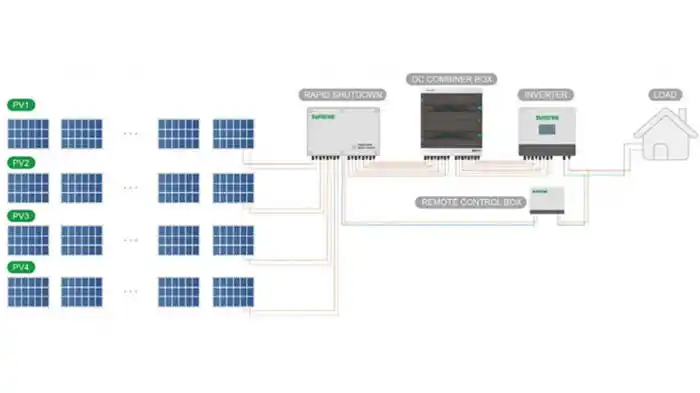
This article walks you through a step-by-step compatibility check to help you determine whether your inverter can work with a string-level RSD, and if so, which type.
The First Question – Does Your Inverter Have an RSD Port?
Before worrying about protocols or brands, check for the physical connection point.
What the Port Looks Like
The RSD port is typically a two-pin or three-pin terminal block located in the inverter’s control wiring area. It is usually labeled with one of the following:
-
“RSD”
-
“Rapid Shutdown”
-
“Safety”
-
“RSD +VIN” or “12V_RSD”
Some inverters provide a dedicated 12V DC power output on these pins specifically for powering an RSD transmitter. For example, many Epever and Growatt inverters feature an RSD port that provides 12V DC output when the inverter is on.
Where to Find It
Look in the inverter’s control wiring compartment—the same area where you find:
-
Dry contact inputs
-
RS485 communication ports
-
Emergency stop (EPO) terminals
The RSD port is often grouped with other safety and communication terminals. Check your inverter’s manual for a terminal block diagram.
If There Is No Port
Some older or entry-level inverters lack any RSD-specific port. In this case, you cannot directly connect an RSD transmitter to the inverter. Options include:
-
Using a standalone RSD controller that does not rely on inverter communication
-
Installing module-level power electronics (MLPE) designed for rapid shutdown, which may operate independently of the inverter
-
Replacing the inverter with one that has built-in RSD support—though this is the most expensive option
Key takeaway: No RSD port = no direct connection. Proceed with caution and consider alternative RSD solutions.
The Second Question – What Communication Protocol Does Your Inverter Use?
Even if your inverter has an RSD port, the communication protocol must match. There are three main types:
Proprietary Protocols
Many inverter brands use their own proprietary communication protocols that only work with their own RSD devices:
-
SolarEdge — uses its own proprietary RSD protocol
-
Tigo — while Tigo MLPE works with virtually any inverter, the RSS Transmitter uses PLC and requires compatible receivers
-
GoodWe — RSD receiver and transmitter system with PLC keep-alive logic
If your inverter uses a proprietary protocol, you are typically locked into the same brand’s RSD ecosystem.
Open Protocols
The SunSpec Communication Signal for Rapid Shutdown is an open industry standard developed by 29 members of the SunSpec Alliance. It defines communication between modules, inverters, and string combiners to support module-level rapid shutdown requirements.
Inverters with SunSpec certification can work with any SunSpec-compliant RSD device, giving you freedom to choose among multiple brands.
Examples include:
-
Fronius Symo Advanced — the first inverter to receive official SunSpec Rapid Shutdown certification, with an integrated PLC transmitter based on the SunSpec standard
-
SMA inverters paired with SunSpec-certified RSD technology
-
APsmart RSD devices — compatible with more than 150 inverter models from 14 brands, including SMA, Fronius, Solis, GoodWe, and Growatt
Dry Contact
Some inverters support a basic dry contact signal:
-
Closed contact = RSD is ON
-
Open contact = RSD is OFF
This is the simplest and most universally compatible protocol. Many inverters provide a dry contact port that can be used for RSD control. The inverter supplies 12V DC power to the RSD transmitter when running, and cuts power when an emergency stop is activated.
Power Line Communication
Some RSD systems transmit signals over the existing DC power lines rather than through a separate control wire:
-
Tigo RSS Transmitter uses PLC to communicate with TS4-F rapid shutdown devices
-
Fronius Symo Advanced has an integrated PLC transmitter based on SunSpec
-
APsmart RSD-S-PLC uses PLC and is compatible with inverters that have an integrated SunSpec-certified transmitter
PLC requires the inverter side to have a compatible PLC coupler or integrated transmitter.
Key takeaway: Check your inverter manual for the supported RSD protocol. If it says “SunSpec,” you have the widest compatibility. If it says a brand name only, you’re likely limited to that brand.
The Third Question – What Is the Voltage and Current Rating of the RSD?
Even if communication is compatible, electrical parameters must match.
Voltage Rating
The RSD’s maximum system voltage must be higher than the inverter’s maximum input voltage.
| Inverter Max Input Voltage | Required RSD Voltage Rating |
|---|---|
| 600V DC | ≥ 600V DC |
| 1000V DC | ≥ 1000V DC |
| 1500V DC | ≥ 1500V DC |
For example:
-
Projoy Electric string-level RSD supports up to 1500V DC and 30A
-
BENY string-level RSD supports up to 1500V DC and 50A per string
-
Solis RSD is designed for systems where maximum operating voltage is ≤ 550V DC
Current Rating
The RSD’s rated current must be higher than the maximum string current.
Common RSD current ratings:
-
15A–20A — typical for module-level RSDs
-
25A–30A — typical for higher-power applications
-
50A — available for string-level applications
Example
If your inverter has:
-
Maximum input voltage: 1000V DC
-
Maximum string current: 15A
You need an RSD rated for ≥ 1000V DC and ≥ 15A.
Key takeaway: Never assume an RSD will work just because it fits physically. Always verify voltage and current ratings against your inverter’s specifications.
The Fourth Question – How Many RSDs Can the Inverter Support?
Per Inverter / Per MPPT
Each inverter or each MPPT channel typically has one RSD control loop. However, multiple RSDs can be daisy-chained on a single control loop.
Maximum Quantity
The manufacturer’s datasheet will specify:
-
Maximum number of RSDs per string — limited by voltage drop and communication signal strength
-
Maximum communication distance — affected by cable length and quality
For example:
-
APsmart RSD-D devices can be connected in series, with output ports of adjacent RSDs connected and then fed to the inverter
-
Tesla MCI-2 units have individual voltage ratings that are additive when connected in the same string
Practical Consideration
If you have a system with multiple strings and multiple MPPT trackers, each MPPT typically requires its own RSD control loop. Check whether your inverter supports one RSD per MPPT or one RSD for the entire inverter.
Key takeaway: Don’t exceed the maximum RSD count specified in your inverter’s manual. Overloading the communication loop can cause intermittent shutdowns or complete failure.
A Practical Compatibility Check Flow
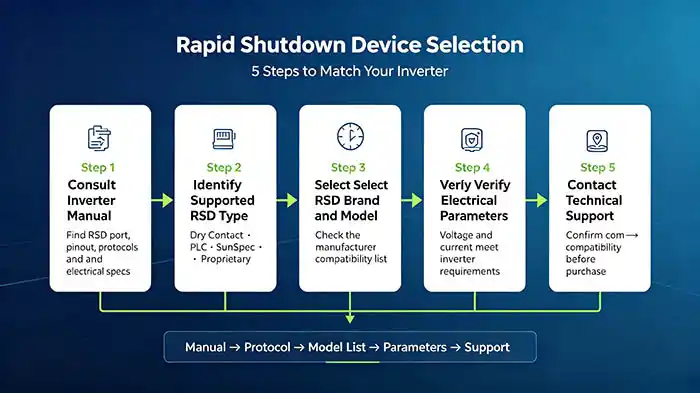
Follow these five steps to ensure compatibility:
Consult the Inverter Manual
Find the “Rapid Shutdown” or “Safety” section in your inverter’s user manual. Look for:
-
Supported RSD protocols
-
Maximum RSD count
-
Electrical specifications
Identify the Supported RSD Type
Determine which of the following your inverter supports:
-
Dry contact — simplest, most compatible
-
PLC — requires PLC coupler
-
SunSpec — open standard, widest choice
-
Proprietary — limited to specific brand
Select Matching RSD Brand and Model
Choose an RSD that:
-
Matches the protocol your inverter supports
-
Is listed on the manufacturer’s compatibility list
For example:
-
APsmart publishes a full compatibility list covering 150+ inverter models from 14 brands
-
Tigo maintains a UL PVRSS-certified inverter compatibility list
-
Fronius issues formal letters of compatibility for third-party RSD devices
Verify Electrical Parameters
Confirm that the RSD’s:
-
Maximum voltage ≥ inverter’s maximum input voltage
-
Rated current ≥ inverter’s maximum string current
Contact Technical Support
If you’re unsure, contact both the inverter manufacturer and the RSD manufacturer before purchasing. Many compatibility issues can be avoided with a quick phone call or email.
Important: Fronius explicitly states that “compatibility of Fronius inverters with third party devices is not guaranteed without a Fronius issued letter of compatibility”. Always get written confirmation when using third-party RSDs.
What If You Already Have an Inverter and Want to Add RSD?
Inverter Has an RSD Port and Supports Dry Contact
This is the easiest retrofit scenario. Simply:
-
Connect the RSD transmitter to the inverter’s RSD port
-
The inverter provides 12V DC power to the transmitter
-
When the inverter loses AC power, the transmitter stops sending the keep-alive signal, and the RSDs shut down
Inverter Has an RSD Port but Uses a Proprietary Protocol
You are limited to the inverter brand’s own RSD products. Check if the brand offers a retrofit RSD kit.
Inverter Has No RSD Port
This is the most challenging scenario. Options include:
-
Install a standalone RSD controller that doesn’t require inverter communication
-
Use a rapid shutdown initiator that connects to multiple inverters
-
Replace the inverter with a modern RSD-compatible model
-
Install module-level power electronics (MLPE) with built-in RSD
Note that retrofitting can be expensive. In some cases, replacing the inverter may be more cost-effective than adding complex standalone RSD controllers.
Frequently Asked Questions (FAQ)
Q1: Can I mix RSDs from different brands on the same inverter?
Not recommended. Different brands typically use different communication protocols—even if they both claim “SunSpec compatibility,” interoperability is not guaranteed unless both devices are explicitly tested and certified together.
Q2: Does a string-level RSD require a separate power supply?
Most RSDs draw power from the PV string itself and do not require an external power supply. However, the transmitter typically requires low-voltage power—usually 12V DC from the inverter. Some transmitters can also be powered by an external 12V or AC-to-DC power supply.
Q3: What happens if I connect an incompatible RSD to my inverter?
Potential outcomes include:
-
No communication — the inverter reports an RSD error and may not start
-
Nuisance tripping — the AFCI may trip repeatedly
-
Damage — incorrect wiring or voltage mismatch can damage the RSD or the inverter’s control circuit
Q4: Can a third-party RSD void my inverter warranty?
Not necessarily, but check with the manufacturer first. Fronius states that “limited use of third party devices will not void the warranty and should be considered acceptable if third party devices are UL listed for this type of application and proper operation can be demonstrated”. However, some brands may be stricter.
Q5: What is UL PVRSS certification and why does it matter?
UL PVRSS certification indicates that a combination of inverter and RSD devices has been tested and certified to meet NEC rapid shutdown requirements. Using PVRSS-certified combinations provides the highest level of confidence in compatibility and safety.
Summary & Next Steps
Installing a string-level rapid shutdown device is not a one-size-fits-all process. Before purchasing any RSD equipment, you must confirm:
-
Your inverter has an RSD port — if not, consider standalone RSD controllers or inverter replacement
-
The communication protocol matches — dry contact, SunSpec, PLC, or proprietary
-
Electrical parameters align — voltage and current ratings must exceed your system’s requirements
-
The RSD count is within limits — don’t exceed the maximum number specified by the inverter manufacturer
Don’t assume all devices work together. Always consult the manuals, check compatibility lists, and—when in doubt—contact technical support.