 English
 Bahasa Melayu
 Suomen kieli
 عربي
عربي  Português
 Français
 Pусский
 Español
How to Tell If Your DC SPD Has Failed After a Lightning Strike | SUNTREE


A lightning strike near your solar installation is a stressful event. Your inverter might still be running, the system might still be producing power—but that doesn't mean your DC surge protection device (SPD) is still protecting you. In fact, an SPD is designed to sacrifice itself to protect your expensive equipment. After a lightning event, it may have already taken the hit and be completely useless, leaving your system vulnerable to the next surge.
The challenge is that SPD failure isn't always obvious. Here's how to check—from the simplest methods to the most thorough.
The Easiest Check – Look for the Status Window
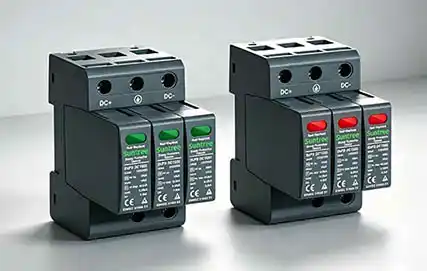
Most modern DC SPDs feature a small status indicator window on the front or top of the device. This is your first and easiest line of defense in determining whether your SPD has survived a lightning strike.
What the Colors Mean
The color coding is typically straightforward:
-
Green – The SPD is functioning normally.
-
Red – The SPD is damaged and needs immediate replacement.
-
Yellow/Orange– Performance limit reached; replacement recommended soon.
If the window has turned from green to red after a thunderstorm, the SPD has likely been compromised by the surge event. Some devices may also have an OFF state indicating that a surge has occurred.
Where to Find It on Different SPD Models
The status window is usually located on the front face of the module or on the top surface. On pluggable SPDs, it's often part of the replaceable cartridge. If your SPD doesn't have a status indicator, you'll need to move on to the next methods.
Important: A green indicator does not guarantee full protection—it only means the SPD hasn't completely failed. Performance may still be degraded.
The Next Step – Visual Inspection for Physical Damage
Even if the status window shows green, a thorough visual inspection can reveal signs that the SPD has been stressed by a lightning strike.
Signs on the Enclosure
Carefully examine the SPD housing for:
-
Cracks – Even hairline cracks can allow moisture and dust to enter, accelerating degradation.
-
Burn marks or charring – A clear sign the SPD has experienced an overload.
-
Melting or bubbling – Indicates extreme heat from a massive surge.
-
Discoloration – Yellowing or browning of the plastic casing suggests thermal stress.
Signs on the Terminals
Don't forget to check the connection points:
-
Melted or deformed terminals
-
Discoloration around connections
-
Black powder or residue near terminals
-
Loose connections
Using a Multimeter – The Go or No-Go Test
For SPDs without status indicators—or when you want a second opinion—a digital multimeter can perform a basic "go or no-go" test.
What You Need
A digital multimeter capable of measuring resistance at high ranges—200kΩ or higher. The megohm (MΩ) range is ideal.
The Procedure
-
Disconnect power – Always de-energize the circuit before testing.
-
Remove the SPD from its base or disconnect its terminals.
-
Set the multimeter to the resistance (Ω) mode at the highest available range.
-
Measure:
-
Positive terminal to ground
-
Negative terminal to ground
-
Positive to negative
-
What the Readings Mean
| Reading | Interpretation |
|---|---|
| OL (open circuit) / Infinity | SPD is not shorted – passes basic test |
| Low resistance | SPD is shorted/ failed – must replace |
| Continuity beep | Short circuit detected – SPD has failed |
A healthy SPD should show as an open circuit (OL) when measured with a standard multimeter because the MOVs inside are designed to be non-conductive under normal voltage conditions.
What This Test Cannot Tell You
This test only detects catastrophic failure (short circuit). It cannot tell you whether the SPD's protective performance has degraded. A unit that passes the multimeter test may still have compromised MOVs that can no longer clamp surges effectively.
Professional Testing – When to Call an Expert
For critical systems or when you need absolute certainty, professional testing equipment can evaluate the SPD's actual performance parameters.
Dedicated SPD Testers
Specialized testers measure:
-
Varistor voltage – The voltage at which the MOV starts conducting. Degradation typically causes this value to decrease.
-
Leakage current – The small current flowing through the SPD during normal operation. A healthy DC SPD typically has leakage current ≤ 50 μA. Each surge event can increase leakage current by 2-8 μA. Readings of 500 μA or a 200% increase over 12 months indicate serious degradation.
-
Clamping voltage – The maximum voltage allowed to pass to protected equipment. An increase means reduced protection.
Professional SPD testers are available from manufacturers like Kvtester and Huazheng, with leakage current measurement ranges typically from 0.1 μA to 199.9 μA.
Recommended Frequency
For large solar plants or systems in high lightning-risk areas, professional testing should be conducted annually. Testing is also strongly recommended after any significant lightning event.
The Conservative Rule – Replace After Any Nearby Strike
Here's the reality: MOVs degrade incrementally with every surge event—each lightning strike or switching transient takes a toll. The internal damage is cumulative, and performance can degrade significantly before the status indicator changes color.
The Industry Best Practice
If lightning strikes within 500 meters of your solar installation, replace the DC SPD—regardless of what the indicator window shows.
Why? Because:
-
The MOVs may have degraded but not yet triggered the mechanical indicator
-
A partially degraded SPD may still show green but offer substantially reduced protection
-
The cost of a replacement SPD is negligible compared to the cost of a damaged inverter or solar panels
The Cost-Benefit Reality
| Item | Typical Cost |
|---|---|
| DC SPD replacement | $30 – $200 |
| Inverter replacement after lightning | $1,500 – $8,000 |
The math is simple. Replace proactively, or risk paying much more later.
Frequently Asked Questions
Q1: Can an SPD fail without any visible sign?
Yes. Internal MOVs can degrade from repeated small surges without triggering the mechanical status indicator or showing external damage. The device may look perfectly fine while offering little to no protection.
Q2: How often should DC SPDs be replaced in normal conditions?
Even without lightning strikes, SPDs should be replaced every 3–5 years due to natural aging and cumulative stress from switching transients and other small surges.
Q3: Does a blown SPD indicator mean the device is completely useless?
Yes. Once the indicator turns red, the internal disconnector has activated and the SPD no longer provides any surge protection. Replace it immediately—do not attempt to reset or repair it.
Q4: Can I test an SPD while it's still connected to the system?
For safety, always disconnect power and remove the SPD from its base before performing resistance tests with a multimeter. Testing in-circuit can produce inaccurate readings and poses a shock hazard.
Q5: What's the difference between Type 1 and Type 2 DC SPDs?
Type 1 SPDs are designed for direct lightning strike protection, while Type 2 SPDs protect against induced surges. Both types use MOV technology and are subject to the same degradation mechanisms.
Summary & Next Steps
After a lightning strike, your DC SPD may have done its job and sacrificed itself to protect your system. Here's your checklist:
-
Check the status window – Red means replace immediately
-
Visual inspection – Look for cracks, burns, discoloration, or melted terminals
-
Multimeter test – Check for short circuits
-
Consider professional testing – For large systems or when in doubt
-
Follow the conservative rule – Replace if lightning struck within 500 meters
When in doubt, replace. The cost of a new SPD is far less than the cost of a failed inverter, damaged panels, or system downtime.
Looking for reliable DC SPD replacement modules? SUNTREE offers a complete range of DC surge protection devices with built-in status indicator windows and optional remote alarm contacts for proactive monitoring. [Browse our DC SPD collection]