 English
 Bahasa Melayu
 Suomen kieli
 عربي
عربي  Português
 Français
 Pусский
 Español
How to Reset a Tripped DC MCCB in a Solar Farm | SUNTREE


In the daily operation and maintenance of a solar farm, tripping of DC Molded Case Circuit Breakers (MCCBs) is a common protective action. When an overload or short circuit occurs on a DC string, the MCCB automatically opens the circuit to protect equipment. However, you cannot simply close it immediately after a trip – this is a mistake many field technicians make.
A correct reset procedure must include: determining the cause of the trip, inspecting the circuit, and operating in the proper sequence. Blindly re‑closing not only risks damaging the breaker but also endangers personal safety. This article walks you through the correct reset method for DC MCCBs in photovoltaic power stations, following a chronological order – from discovery to successful reset.
Before Touching Anything – Observe the Breaker Position
Before you touch anything, first observe the handle position. This is the most critical first step in the entire reset process.
The Three Positions
Most DC MCCBs have three distinct handle positions:
| Position | Handle State | Meaning |
|---|---|---|
| ON | Fully up | Circuit is closed and conducting |
| OFF | Fully down | Manually opened |
| TRIPPED | Middle position | Fault‑induced opening |
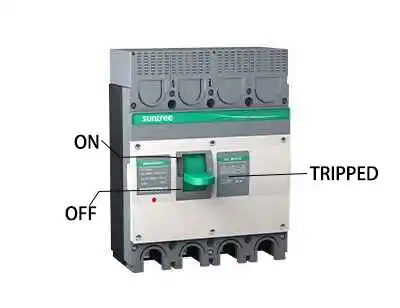
If the handle is in the middle position, the breaker has tripped due to a fault, not because someone turned it off. This middle position is an important safety indicator – it tells you that an abnormality exists and must be investigated first.
What the Trip Indicates
Tripping means the breaker detected an overcurrent – either overload or short circuit. Never try to push the handle directly from the middle to ON – this will not reset the breaker and may damage its internal mechanism.
The correct first action is: push the handle from the middle position to the OFF position. Moving to OFF is the necessary prerequisite for resetting, as it resets the internal trip mechanism.
Next – Identify the Likely Cause Before Resetting
Before you reset, take a few minutes to perform a basic fault diagnosis. Skipping this step is the most common on‑site mistake.
Check for Visual Clues
On arrival, carry out a visual inspection:
-
Is there a burning smell nearby? – This may indicate overheated cables or insulation breakdown.
-
Are cables damaged, blackened, or loose? – Check the terminal connections on both sides of the breaker.
-
Does the inverter on that circuit show any fault codes? – Check the inverter display or SCADA system; many faults leave a record on the inverter side.
-
Is the breaker casing discoloured or deformed? – Discolouration usually means internal overheating.
Ask About Recent Events
Ask site personnel or review the maintenance log:
-
Was there a lightning strike or severe weather just before the trip?
-
Were there any new equipment start‑ups or load changes?
-
Were personnel working nearby who might have accidentally touched the cables?
-
Has this circuit tripped repeatedly recently?
Common reasons for MCCB tripping include: load current exceeding the rating, line short circuit, earth fault, insulation ageing, and high ambient temperature. Knowing the background helps you quickly narrow down the cause.
The Safe Reset Procedure – Step by Step
After the preliminary checks, follow these steps to reset safely.
Step One – Push the Handle to OFF
Push the handle from the middle position firmly to the OFF position. You will feel a distinct click or detent.
This step is crucial – it resets the internal trip mechanism. If you cannot push it fully or feel a jam, the internal mechanism may be damaged.
Safety note: Stand to the side of the breaker, not directly in front of the arc‑chute area, and wear appropriate PPE.
Step Two – Wait a Few Seconds
Wait 5‑10 seconds to allow the internal mechanism to reset completely. This short delay also lets any thermal elements cool slightly.
Step Three – Push Firmly to ON
Push the handle from OFF firmly to ON. If it does not stay in the ON position or immediately springs back to the middle, the fault condition still exists.
-
If it stays ON, proceed to step four.
-
If it trips again instantly, do not attempt another reset – go to the next section.
Step Four – Verify Operation
After a successful reset, check:
-
The DC current reading on the monitoring system – is it within the normal range?
-
Is there any abnormal heating on the breaker or cables?
-
Does the inverter operate normally?
Monitor the circuit for at least 10- 15 minutes to ensure stable operation.
What If It Trips Again Immediately?
Do Not Keep Resetting
Repeated reset attempts can damage the breaker or worsen the fault. Do not attempt more than two resets in a row.
Isolate the Circuit
Disconnect all loads on that circuit (e.g., turn off the inverter and open DC isolators), then try to reset the MCCB alone.
-
If the breaker resets and stays ON with loads disconnected, the fault is on the load side – inspect the inverter, cables, and combiner box.
-
If the breaker still trips with no load, the fault may be within the breaker itself or a cable short circuit – proceed to diagnostics.
Call for Advanced Diagnostics
Use an insulation resistance tester (megger) to check cable insulation, and a multimeter to check for short circuits between poles or to earth. Thermal imaging can also help locate hot spots. If you lack the tools or expertise, contact a qualified electrical engineer or the manufacturer’s service team.
When to Replace Instead of Reset
A reset is not always the right answer. Consider replacing the MCCB if:
-
The breaker has tripped under short‑circuit conditions more than 5‑10 times – the internal contacts may be pitted or worn, increasing resistance and heat.
-
The handle feels loose or lacks a crisp “click” after resetting – this indicates mechanical wear.
-
The casing shows cracks, burn marks, or discolouration – internal arcing may have damaged insulation.
-
The breaker trips repeatedly without a clear external cause – internal components may have degraded.
Always replace with an identical rating and type. Consult the original manufacturer’s specifications.
Frequently Asked Questions (FAQ)
Q1: Why does my DC MCCB have a “TRIPPED” position instead of just OFF?
A: The middle position distinguishes between a manual OFF and an automatic fault trip. It alerts maintenance personnel that a fault occurred and needs investigation before re‑closing.
Q2: Can I reset a DC MCCB remotely?
A: Most standard MCCBs do not support remote reset – they require manual operation. Some models with motorised operating mechanisms can be reset remotely, but these are more expensive and less common in solar farms.
Q3: How many times can a DC MCCB be reset before it wears out?
A: For normal overload trips, several hundred resets are acceptable. For short‑circuit trips, we recommend no more than 5‑10 total over the breaker’s lifetime, as each high‑current interruption erodes the contacts. Always refer to the manufacturer’s data sheet for specific endurance ratings.
Q4: What should I do if the handle won’t move to OFF?
A: If the handle is stuck in the middle and cannot be pushed to OFF, the internal mechanism may be welded or jammed. Do not use excessive force. Isolate the upstream power and call for professional repair or replacement.
Q5: Is it safe to reset a DC MCCB under load?
A: Yes, MCCBs are designed to be closed under load, but if the fault is still present, it will trip immediately. Always follow the safe procedure and wear appropriate PPE.
Summary & Next Steps
To summarise:
-
Observe – Check the handle position. If it is in the middle, do not push to ON directly.
-
Investigate – Look for visual clues and ask about recent events.
-
Reset – Push to OFF, wait 5‑10 seconds, then push firmly to ON.
-
Verify – Monitor current and temperature after reset.
-
If it trips again – Do not keep resetting; isolate and diagnose.
-
Replace – If the breaker shows signs of wear or repeated fault trips.
Always remember: safety first. Never bypass or defeat the trip mechanism. A tripped MCCB is protecting your equipment – respect that protection.
Downloadable Resource
For a handy on‑site reference, download SUNTREE’s “DC Breaker Operation Safety Card for Solar Farms” – a pocket‑sized guide with quick steps and emergency contacts. Visit our website or contact your SUNTREE representative to get your copy.
This guide is intended for trained electrical personnel. Always follow local safety regulations and the manufacturer’s specific instructions for your breaker model.