 English
 Bahasa Melayu
 Suomen kieli
 عربي
عربي  Português
 Français
 Pусский
 Español
Why Is My Rapid Shutdown Device Not Turning Back On After a Test?


In photovoltaic systems, the failure of a rapid shutdown device (RSD) to restart after a test is a common but frustrating problem. Many technicians, after completing a shutdown test, find the system won't re-energize and instinctively assume a hardware failure. However, based on our experience, the vast majority of "won't turn back on" cases are not caused by hardware failure, but by errors in the operational procedure.
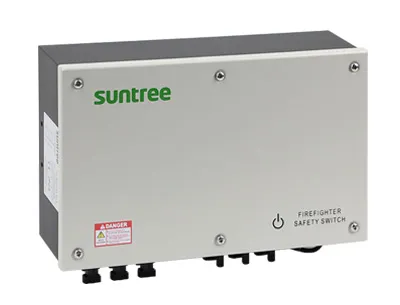
Below, we outline the four most common operational misconceptions and the correct procedures to address them, followed by hardware troubleshooting steps and a systematic recovery process.
Misconception – "It Will Turn On Automatically"
The Reality: The vast majority of RSD systems will not automatically recover after a shutdown test. Their design logic is that once a shutdown is triggered, they must receive a clear, continuous "permission to operate" signal to re-engage.
What to Do: Check your transmitter or inverter for a "RESET" button, or determine if a manual power cycle is required. For many systems, after a test, you need to reset the emergency stop button (E-Stop) or reconnect the AC power to the transmitter.
Misconception – "The Transmitter Is Still Sending the ON Signal"
The Reality: After a shutdown test, the transmitter may still be in "shutdown" mode and not switched back to "ON." This is the most common and easiest problem to correct. If the transmitter isn't sending the "heartbeat" signal, the RSD receivers naturally won't conduct.
Check: Look at the indicator light on the transmitter. If it shows red or "OFF," it is still in a shutdown state. For example, on a Solis inverter, the operation is to turn the switch clockwise to turn the transmitter back on. Many emergency stop buttons need to be pulled out to reset.
Misconception – "If One RSD Is Dead, Others Will Still Work"
The Reality: In serial communication architectures using Power Line Communication (PLC), this is not always the case. A single faulty RSD (particularly a short circuit) can pull down the entire communication line, preventing all RSDs from receiving the turn-on signal.
What to Do: Disconnect the suspected string and test each RSD individually. Find the faulty RSD and replace it.
Misconception – "Power Cycling the Inverter Will Fix It"
The Reality: Sometimes this works, but not always. If the RSD itself is locked in a shutdown state, restarting the inverter won't change the RSD's state.
What to Do: First, confirm the transmitter is in "ON" mode. Then, if available, manually operate the RSD's reset button. Some systems require a specific power cycle sequence—for instance, a Powerwall+ may need the switch turned off, waiting, and then back on in a specific pattern.
The Possibility of a Genuine Hardware Failure
If the operational steps above don't resolve the issue, a genuine hardware failure may be the cause.
-
Transmitter Failure: The internal relay in the transmitter may be stuck in the OFF position. Use a multimeter to check if there is a signal at its output.
-
RSD Internal Failure: The receiving circuit in a specific RSD might be damaged and unable to process the turn-on command. Isolate and test each one.
-
Wiring Break: During the shutdown test, a connector may have loosened due to thermal expansion and contraction. Check all MC4 connectors for secure, dry connections.
A Systematic Recovery Procedure
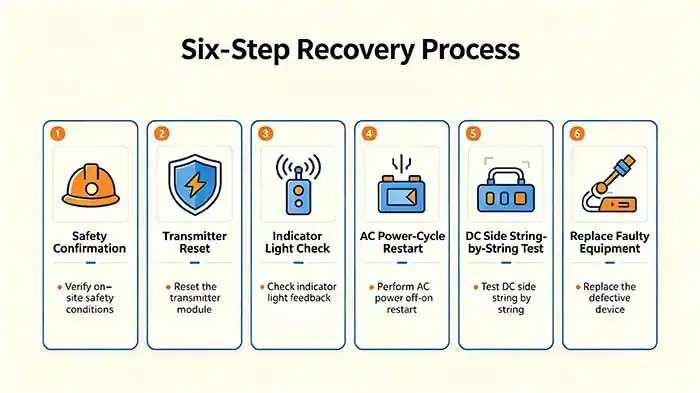
Follow these steps in order to systematically restore your system.
-
Ensure all personnel are safe and confirm there is no emergency situation.
-
Reset the transmitter to the ON position.
-
If the transmitter has an indicator light, confirm it shows "ON."
-
Disconnect the inverter's AC power, wait for one minute, and then reconnect it.
-
If the system still does not recover, disconnect the DC side and test each RSD individually.
-
Locate and replace the faulty device.
Frequently Asked Questions
Q1: How long should I wait after a test before the system turns back on?
A: The system should typically recover within one minute. If it takes more than five minutes, there is likely an issue.
Q2: Can a rapid shutdown device be reset manually at the module?
A: Most module-level RSDs do not have a manual reset button. They can only be reset via the transmitter signal.
Q3: Does the inverter need to be reprogrammed after an RSD failure?
A: Usually not. After replacing a faulty RSD, the system should automatically recognize it and resume normal operation.
Summary & Next Steps
Summary: The most common reasons a system won't turn back on after a test are an un-reset transmitter or a broken communication link. Follow the systematic procedure in this article to troubleshoot.
Next Steps: If you have followed this guide and your system is still not operational, contact SUNTREE technical support for advanced RSD fault code diagnostic tools.