 English
 Bahasa Melayu
 Suomen kieli
 عربي
عربي  Português
 Français
 Pусский
 Español
How to Store Spare DC Protection Components for Solar Systems | SUNTREE


Spare DC protection components are the insurance policy of every solar installation. When a DC breaker trips, an SPD degrades, or a fuse blows during maintenance, having the right spare on hand means the difference between minutes of downtime and days of waiting for replacement parts.
However, here’s the problem that many warehouse managers and O&M teams overlook: improperly stored spares can fail before they’re ever installed. A surge protector that sat in a damp warehouse for two years may have already degraded internally. A DC breaker stored under extreme heat may have brittle plastic housing and dried-out lubricants. These components don’t come with an infinite shelf life—and the way you store them directly determines whether they’ll perform when called upon.
This guide covers the essential storage conditions, shelf life considerations, and best practices for keeping your spare DC MCBs, SPDs, fuses, and RSDs ready for service.
Temperature – Keep It Moderate
Ideal Range
Spare DC protection components should be stored in an environment with stable temperatures. While many components can survive extreme temperatures during transport, long-term storage is a different story.
The recommended storage temperature range for most DC protection components is -5°C to +40°C for general storage. However, manufacturer specifications often show wider tolerances:
| Component Type | Typical Storage Temperature Range |
|---|---|
| DC MCB/MCCB | -40°C to +75°C |
| DC Fuses | -5°C to +40°C |
| SPDs | -40°C to +85°C |
| RSD | Varies by manufacturer, typically -40°C to +85°C |
Key takeaway: Just because a component can withstand -40°C doesn’t mean it should be stored there long-term. Aim for the moderate range and avoid extremes.
Why It Matters
High temperatures accelerate multiple degradation mechanisms:
-
Plastic aging: Housing materials become brittle over time when exposed to sustained heat.
-
Internal lubricant drying: Breakers contain mechanical lubricants for smooth operation of contacts and springs. Heat causes these to dry out or thicken.
-
Accelerated MOV degradation: Surge protectors containing metal oxide varistors (MOVs) degrade faster at elevated temperatures.
Low temperatures pose their own risks:
-
Plastic embrittlement: Some plastics become brittle at sub-zero temperatures, increasing the risk of cracking from minor impacts.
-
Condensation risk: When cold components are brought into warm environments, condensation can form on internal surfaces.
Critical warning: Never store components in direct sunlight, inside vehicles during summer, or near heat-generating equipment like inverters or transformers. A car dashboard in summer can easily exceed 60°C—well beyond safe long-term storage conditions for most electronic components.
Humidity – Keep It Dry
Ideal Relative Humidity
The gold standard for humidity control is below 70% relative humidity (RH). If humidity consistently exceeds 80%, you should consider using a dehumidifier or desiccant packs in your storage area.
Many manufacturers specify more detailed humidity requirements:
-
At +40°C, relative humidity should not exceed 50%
-
At lower temperatures, humidity can be higher—up to 90%—provided there is no condensation
Why It Matters
Moisture is the enemy of electrical components, and for good reason:
Terminal oxidation: High humidity causes copper and silver-plated terminals to oxidize. Oxidized terminals have higher contact resistance, leading to heating and potential failure when the component is finally installed.
Internal corrosion: For SPDs and RSDs containing circuit boards, moisture can lead to corrosion of solder joints and PCB traces—damage that may not be visible until the component fails in service.
Insulation degradation: Moisture absorption can reduce the insulation resistance of internal materials, potentially leading to tracking or arcing under high voltage.
Practical Tips
-
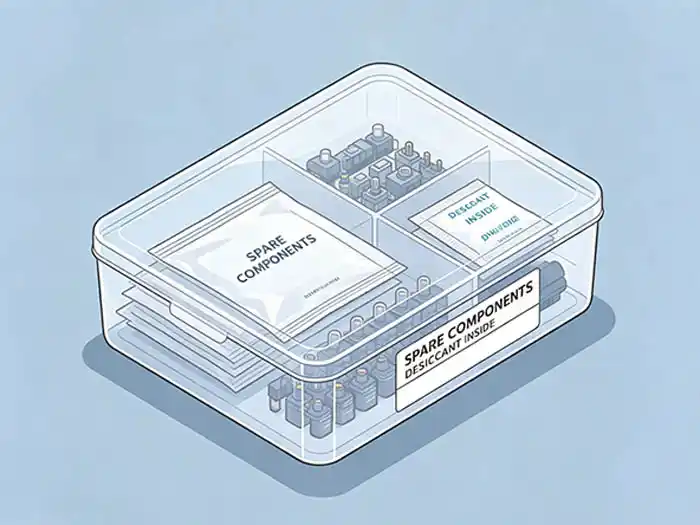
Silica gel desiccant packs: Place desiccant packs inside storage containers for sensitive components, especially in coastal or humid regions.
-
Monitor conditions: Use a simple hygrometer in your storage area to track humidity levels.
-
Avoid concrete floors: Concrete can release moisture. Store components on shelving, not directly on the floor.
-
Watch for condensation: If temperature fluctuates significantly, condensation can form inside packaging. Insulated storage areas help minimize this risk.
Electrostatic Discharge – Handle with Care
Which Components Are Sensitive
Not all DC protection components are equally sensitive to ESD, but the ones that contain active electronics require special attention:
-
Rapid Shutdown Devices (RSD): Contain microcontrollers and power electronics that can be damaged by static discharge.
-
SPDs with monitoring electronics: Smart SPDs with status indicators or remote signaling contain sensitive circuits.
-
Smart breakers: Any DC breaker with electronic trip units or communication capabilities.
Storage Practice
Leave components in their original anti-static packaging until the moment of installation. These packages are specifically designed to protect against ESD and often include moisture-barrier properties as well.
Do not store electronic protection devices in regular plastic bags in dry environments. Dry conditions increase static build-up, and ordinary plastic bags offer no ESD protection. If original packaging is damaged, transfer the component to an ESD-safe bag or conductive ESD box.
Handling Guidelines
When handling ESD-sensitive components:
-
Use a grounded wrist strap when possible.
-
Touch a grounded metal surface before handling.
-
Avoid working on carpeted surfaces or in areas with synthetic materials that generate static.
Mechanical Protection – Avoid Physical Damage
Stacking and Weight
Never stack heavy items on top of breakers or fuses. The housings of DC MCBs and MCCBs are designed to withstand normal operational forces, but sustained weight from stacked boxes can cause:
-
Housing deformation: Even slight warping can affect the internal mechanism of a breaker or prevent proper mounting.
-
Contact misalignment: In extreme cases, physical stress can misalign internal contacts.
-
Ceramic tube cracking: For fuses with ceramic bodies, impact or pressure can cause micro-cracks that aren't visible but compromise performance.
Dust and Contamination
Dust isn't just unsightly—it's a performance hazard:
-
Dust can enter terminal openings and create conductive paths.
-
Combined with moisture, dust can cause tracking or arcing.
-
Dust accumulation on heatsinks can reduce thermal dissipation.
Use covered storage bins or keep components in their original cartons to prevent dust ingress. If components become dusty before installation, wipe them clean before wiring.
Labeling – Your Most Important Organizational Tool
A well-labeled storage system saves time and prevents errors:
Every spare should be clearly labeled with:
-
Model number and part number
-
Rated voltage and current
-
Type
-
Purchase date
-
Receiving/inspection date
Consider using color-coded labels for different component types or voltage ratings to make visual identification faster.
Shelf Life Considerations for Different Components
Not all DC protection components age the same way. Here's what to expect for each type:
Fuses
Shelf life: Virtually indefinite under proper storage conditions, but some manufacturers recommend no more than 2 years before re-inspection.
Fuses are among the most durable stored components. The fusible element is sealed within a ceramic or glass tube filled with quartz sand. If kept dry and free from physical damage, they can last for many years.
Key considerations:
-
Glass tube fuses: Avoid impacts that could crack the glass.
-
Terminal oxidation: Check for oxidation on end caps before installation.
-
Re-inspection: Some manufacturers allow storage beyond 2 years if the fuse passes re-inspection.
MCB / MCCB (DC Breakers)
Shelf life: 10+ years, but with an important caveat.
DC breakers contain mechanical springs and contacts that can benefit from occasional exercise. Recommendation: Manually operate (open and close) the breaker every 5 years to keep the mechanism lubricated and free-moving.
Key considerations:
-
Mechanical wear from storage is minimal, but lubricants can dry out over very long periods.
-
Check for smooth operation before installation.
-
If the breaker feels gritty or sticks, consider replacing it.
SPD (MOV-based Surge Protective Devices)
Shelf life: Approximately 5–8 years, even if never used.
This is the most critical shelf life consideration for most warehouses. SPDs contain Metal Oxide Varistors (MOVs) as their core protection element. MOVs degrade over time through a natural process:
-
They slowly conduct a small amount of leakage current during normal operation.
-
Even without electrical stress, the internal chemistry of the MOV changes gradually.
-
High temperatures accelerate this degradation.
Practical recommendations:
-
Always mark the purchase date on SPD packaging.
-
Implement a rotation policy: Use older SPDs first.
-
Pre-installation testing: Before installing a stored SPD, test it with a multimeter. If leakage current is abnormal, discard the unit.
-
Check status indicators: Many modern SPDs have a visual status window—if it shows red, the unit must be replaced.
RSD (Rapid Shutdown Devices)
Shelf life: Approximately 5–10 years, primarily limited by internal electrolytic capacitors.
RSDs contain active electronics including microcontrollers, power switches, and capacitors. Electrolytic capacitors have a finite lifespan even when not powered—the electrolyte gradually dries out.
Key considerations:
-
Keep in original ESD-safe packaging until installation.
-
Store in cool, dry conditions to extend capacitor life.
-
Follow manufacturer-specific storage recommendations—some RSDs have stricter requirements than others.
Inventory Management Best Practices
Beyond the physical storage conditions, how you manage your spare parts inventory is equally important.
First-In, First-Out (FIFO)
Always use the oldest stock first. This is particularly critical for SPDs with their 5-8 year shelf life, but good practice for all components.
Implementation tips:
-
Arrange shelves so older stock is at the front.
-
Use bin cards or inventory software to track receipt dates.
-
Train staff to always pick the oldest available stock.
Regular Inspections
Schedule inspections every 6 months of your spare parts inventory:
-
Visual inspection: Check for signs of moisture damage, oxidation, or physical damage.
-
Check status indicators: For SPDs with visual status, verify they haven't switched to "failed."
-
Verify labeling: Ensure labels are still legible and accurate.
-
Update inventory counts: Reconcile physical stock with records.
Minimum Stock Levels
For critical components—especially those that are inverter-specific or have long lead times—maintain a minimum stock level. When inventory drops to this level, trigger a reorder.
Which components need safety stock:
-
Inverter-specific RSDs: Often model-specific and not interchangeable.
-
High-current DC breakers: Less common sizes may have longer lead times.
-
SPDs: With their limited shelf life, you need enough to cover replacements but not so many that they expire on the shelf.
Frequently Asked Questions
Q1: Can I store DC breakers outdoors in a weatherproof box?
A: Not recommended. Even with a weatherproof enclosure, outdoor storage exposes components to temperature fluctuations that accelerate plastic aging and lubricant degradation. Condensation from daily temperature cycles can also introduce moisture. Store indoors in a climate-controlled environment whenever possible.
Q2: How do I know if a stored SPD has degraded?
A: Before installation, test the SPD using a multimeter according to the manufacturer's instructions. Check for abnormal leakage current. Also check the visual status indicator if the unit has one—if it shows red or "failed," discard the unit. When in doubt, replace it—an SPD is far cheaper than the equipment it protects.
Q3: Is it okay to store different types of components together?
A: Yes, but with precautions. Avoid storing fuses loose with metal tools—a metal object contacting both ends of a fuse could create an unintended short circuit. Use separate bins or compartments. Also, keep ESD-sensitive components separate from items that could generate static.
Summary & Next Steps
The bottom line: Proper storage of spare DC protection components isn't complicated, but it requires attention to four key factors—temperature, humidity, ESD protection, and mechanical care—plus disciplined inventory management.
Key takeaways:
-
Store at moderate temperatures with humidity below 70%.
-
Keep components in original packaging until installation.
-
Label everything with model, rating, and purchase date.
-
Follow FIFO—use older stock first.
-
Remember that SPDs have a limited shelf life of 5-8 years, even unused.
-
Inspect inventory every 6 months.
Your next step: Audit your current spare parts storage area today. Check temperature and humidity levels. Verify that all components are properly labeled with purchase dates. And if you have SPDs that have been sitting on the shelf for more than 5 years, it may be time to test—or replace—them.