 English
 Bahasa Melayu
 Suomen kieli
 عربي
عربي  Português
 Français
 Pусский
 Español
How to Clean Corroded Terminals on a DC MCCB Safely?


Corroded terminals on a DC Molded Case Circuit Breaker (MCCB) are more than just an eyesore—they are a serious operational hazard. Corrosion increases electrical resistance, which generates heat, reduces efficiency, and can ultimately lead to equipment failure or fire. However, cleaning corroded terminals is itself a high-risk procedure if not performed correctly. This guide provides a step-by-step safety-first approach to restoring proper electrical contact on DC MCCB terminals.
Important: Cleaning is only appropriate after a qualified person has isolated every energy source and applied lockout/tagout. If the breaker or panel manufacturer does not permit field cleaning, or if the terminal has heat damage, pitting, melted insulation, or water exposure, replacement—not cleaning—is the correct action.
Before You Start – Safety Preparations
Safety is non-negotiable when working on any electrical equipment. MCCB maintenance is never just “inspection”—it is electrical risk management.
Lockout/Tagout (LOTO)
Isolate the energy source by opening the upstream disconnect or feeder breaker. Apply your personal lock and tag to the disconnecting device to prevent accidental re-energization. Under OSHA standards, LOTO is a critical safety measure and a legal requirement.
Key point: The MCCB handle in the “OFF” position is a handle position, not proof of zero voltage. Do not rely on it.
Verify Zero Voltage
Use a properly rated, calibrated multimeter or voltage detector to confirm zero voltage. Follow the “Live-Dead-Live” method:
-
Test the meter on a known live circuit to confirm it works.
-
Test the MCCB terminals—measure terminal-to-ground and terminal-to-terminal on all poles.
-
Re-test the meter on the known live circuit to confirm it still works.
Do not assume the power is off. This is a non-negotiable step before touching any component.
Wear Proper PPE
-
Voltage-rated insulating gloves
-
Safety goggles or face protection
-
Arc-rated clothing appropriate for the system voltage and available incident energy
Corrosion powder can be skin-irritating; gloves also protect against this.
Prepare Your Tools
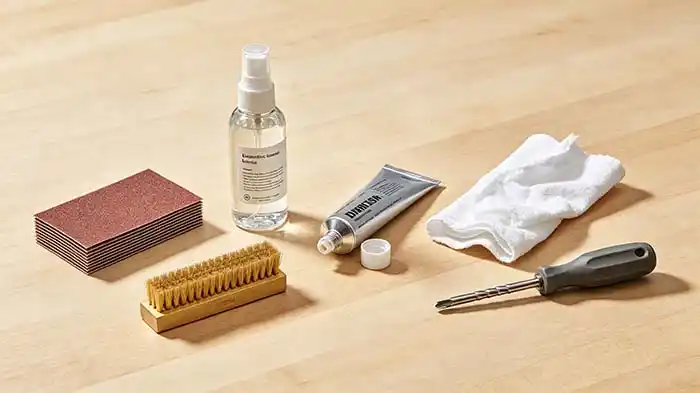
Gather these items before you begin:
-
Fine sandpaper—#200 to #1000 grit is acceptable for light oxidation
-
Wire brush—brass only. Do not use steel brushes, which can scratch protective plating
-
Electrical contact cleaner—a dedicated, plastic-safe, residue-free contact cleaner
-
Dielectric grease—silicone-based compound for corrosion prevention
-
Clean, lint-free cloths
-
Torque screwdriver or wrench—calibrated to manufacturer specifications
-
Vacuum cleaner
Caution: Do not use non-specialized liquids such as water, gasoline, or alcohol-based drinks—these contain moisture or corrosive components that can cause further damage.
Step-by-Step Cleaning Procedure
Remove the Cable
Loosen the terminal screw and carefully remove the cable from the terminal. Pay attention not to lose any washers, Belleville washers, or flat washers. If present, note their order for reassembly.
Inspect the Damage
Assess the corrosion severity before proceeding:
-
Light surface oxidation—cleanable.
-
Heavy pitting—the terminal has lost material and the MCCB should be replaced.
-
Heat damage, melted insulation, arc evidence, or water intrusion—do not clean; replace and investigate the root cause.
Preserve the evidence before touching anything. Photograph the condition first.
Clean the Terminal Surface
Using fine sandpaper (400–600 grit), gently polish the terminal contact surface to remove the oxide layer.
-
Only polish the contact area—Do not extend the abrasion beyond where the cable lug makes contact.
-
Polish until the surface is shiny and bright.
-
Do not sand away evidence of heat, arcing, or water damage.
Clean the Cable Lug
Similarly, polish the contact surface of the cable lug using the same fine sandpaper. Both mating surfaces must be clean for a proper low-resistance connection.
Remove Debris
-
Use the vacuum cleaner to remove loose debris from the terminal area.
-
Apply electrical contact cleaner to a clean cloth and wipe all polished surfaces to remove metal dust, grit, and any residual contamination.
-
Allow the contact cleaner to evaporate completely before proceeding.
Do not spray contact cleaner directly into the MCCB—spray onto a cloth and wipe. Generic sprays can attack molded cases, labels, insulation, seals, or internal lubricants.
Apply Dielectric Grease
Apply a thin, even layer of dielectric grease to the terminal contact surface.
-
Dielectric grease is a silicone compound that seals out moisture, prevents corrosion, and supports electrical performance by reducing voltage drops.
-
Do not apply grease to the screw threads—this can affect torque readings and may cause the screw to loosen over time.
-
Apply only to the flat contact faces where the cable lug meets the terminal.
Reconnect and Torque
Reattach the cable lug to the terminal, ensuring washers are in their correct order. Tighten the terminal screw using a torque screwdriver or wrench to the manufacturer’s specified torque value.
-
Torque specifications are typically found on the MCCB nameplate or in the manufacturer’s documentation.
-
Common torque ranges vary by terminal size: M5 screws ~2.3–3.4 N·m, while larger M10–M12 bolts may require 40–50 N·m.
-
Do not guess—over-tightening can damage terminals; under-tightening increases resistance and generates heat.
What to Do If Corrosion Has Spread Inside the MCCB
If corrosion has entered the MCCB through the terminal screw holes or along the conductor path, cleaning the external terminals will not solve the underlying problem. Internal corrosion can cause:
-
Trip mechanism sticking or jamming
-
Increased contact resistance inside the breaker
-
Calibration drift or complete failure to trip when needed
Recommendation: Replace the entire MCCB. The molded case of an MCCB must never be opened in the field—doing so voids the UL listing, warranty, and calibration. Factory-calibrated parts cannot be restored in the field without specialized equipment and training.
After Cleaning – Verification
Before Restoring Power
Measure insulation resistance from each terminal to ground using a properly rated insulation resistance tester. This ensures no conductive debris was left behind that could cause an unintended short circuit.
After Restoring Power
-
Voltage drop test: With the circuit under full load, measure the voltage drop across the cleaned MCCB terminals. Compare this reading to adjacent, healthy MCCBs on the same system. A significantly higher voltage drop indicates persistent high resistance.
-
Thermal imaging: Use a thermal imaging camera or infrared thermometer to check the cleaned terminal temperature under load. If the temperature exceeds approximately 60°C or is more than 30°C above ambient temperature, there is a problem requiring further investigation.
-
Visual re-check: Inspect the connection after a few hours of operation to ensure no loosening has occurred due to thermal cycling.
Preventive Measures to Avoid Future Corrosion
Apply Dielectric Grease at Installation
When installing a new MCCB, apply a thin layer of dielectric grease to the terminal contact surfaces before connecting cables. This creates a moisture barrier that prevents corrosion from the start.
Match Metals to Avoid Galvanic Corrosion
Ensure the cable lug and MCCB terminal are made of compatible metals:
-
Copper-to-copper—acceptable
-
Aluminum-to-aluminum—acceptable with oxide-inhibiting compound
-
Copper-to-aluminum—requires special bi-metallic connectors or adaptors; direct contact can cause galvanic corrosion
Maintain Enclosure Sealing
-
Keep the distribution box or panel enclosure well-sealed to prevent moisture ingress.
-
In high-humidity or coastal environments, consider MCCBs with moisture-resistant internal coatings and corrosion-resistant terminals.
-
Regularly inspect for condensation staining, which indicates moisture problems.
Establish a Maintenance Schedule
-
Visual inspection: Monthly—look for discoloration, dust buildup, and early signs of corrosion.
-
Connection tightness check: Every six months—verify terminal bolt torque.
-
Thermal imaging survey: Annually—scan all terminals under load to detect hot spots before they become failures.
-
Harsh environments (dusty, humid, or corrosive): Inspect every six months.
Frequently Asked Questions (FAQ)
Q1: Can I use WD-40 to clean corroded terminals?
A: Not recommended. WD-40 is a lubricant and water-displacing agent, not a dedicated electrical contact cleaner. It can leave an oily residue that attracts dust and dirt, potentially causing further problems. Use a dedicated, residue-free electrical contact cleaner instead.
Q2: How often should I clean MCCB terminals?
A: You should not clean terminals on a fixed schedule—clean only when there is evidence of a problem. Triggers for cleaning include:
-
Abnormal heat detected during thermal imaging surveys
-
Visible corrosion or oxidation on terminal surfaces
-
Intermittent electrical issues traced to the connection
Preventive application of dielectric grease at installation is far more effective than定期 cleaning.
Q3: Is it safe to use a wire brush on a DC MCCB terminal?
A: Yes, but only with a brass brush (softer than the terminal metal). Do not use steel brushes—steel is harder than most terminal platings and can scratch or remove the protective surface layer, accelerating future corrosion.
Q4: What if the terminal screw is seized due to corrosion?
A: Do not force it. Apply a penetrating oil designed for electrical applications and allow it to work overnight. If the screw still will not turn, the terminal assembly may need replacement. In severe cases, replace the entire MCCB rather than risk damaging the terminal threads.
Q5: Can I clean terminals while the circuit is still energized?
A: Absolutely not. Never work on energized equipment. Turn off power, follow LOTO procedures, and verify zero voltage before touching any terminal.
Summary & Next Steps
Cleaning corroded terminals on a DC MCCB is an effective maintenance practice—when done safely and correctly. The key takeaways:
-
Safety first: LOTO, zero voltage verification, and proper PPE are non-negotiable.
-
Inspect before cleaning: If there is pitting, heat damage, or internal corrosion, replace—don't clean.
-
Use the right tools: Fine sandpaper, brass brushes, dedicated contact cleaner, and dielectric grease.
-
Torque to specification: Never guess—use a calibrated torque tool.
-
Verify after cleaning: Thermal imaging and voltage drop testing confirm the job was done right.
-
Prevent future corrosion: Apply dielectric grease at installation and maintain enclosure sealing.
SUNTREE offers MCCB terminal maintenance kits containing all the essential tools—contact cleaner, dielectric grease, brass brushes, and application guides—to keep your DC MCCB terminals in optimal condition. For more information on our MCCB maintenance solutions, visit our website or contact our technical support team.